Email filtering, training, passwords, EDR, and access control each stop different attacks. See how layered security protects a small business.
Throughout Cybersecurity Awareness Month, we’ve looked at one piece of business security at a time: the inbox, your team, your passwords, your devices, admin access, and remote access. Each post focused on a single layer.
To close out the month, we want to step back and look at the whole picture, because that’s where real protection comes from. No single tool stops every attack. What keeps a business safe is a set of layers that cover each other’s blind spots.
What is layered security?
Layered security, sometimes called defense in depth, means using several independent protections so that if one fails, another catches the threat. An attacker has to get past every layer to cause serious harm, and each layer they face makes success less likely.
Think about how you protect your building. You lock the doors, but you also have an alarm system, cameras, a safe for valuables, and employees who’d notice a stranger walking into the back office. None of those is perfect. Together, they make a break-in hard to pull off and easy to catch.
Cybersecurity works the same way.
What are the layers of cybersecurity a small business needs?
A well-protected small business typically needs six core layers: email protection, security awareness training, password management with MFA, managed endpoint detection and response, privileged access management, and secure remote access. Each one addresses a different stage of an attack.
Here’s a quick recap of each, with links to the full posts:
- Email protection stops phishing, malicious attachments, and impersonation before they reach your team. Read: Your Inbox Is the Front Door
- Security awareness training helps employees recognize and report threats that slip through. Read: Your Team Is Your First Line of Defense
- Password management and MFA keep stolen or reused credentials from turning into account takeovers. Read: Sticky Notes and Spreadsheets Aren’t a Password Strategy
- Managed EDR watches every device for suspicious behavior and stops attacks in progress, backed by a 24/7 SOC. Read: Antivirus Isn’t Enough Anymore
- Privileged access management limits admin rights so a compromised account can’t do much damage. Read: Admin Accounts Are the Keys to the Kingdom
- Secure remote access keeps outside connections verified, limited, and recorded. Read: Remote Access Without Leaving the Door Open
How do the layers work together during an attack?
During a real attack, each layer gets a chance to stop the attacker at a different step. Even if one layer misses, the next one can catch it, which is why businesses with layered protection rarely suffer a full-scale breach.
Let’s walk through a common scenario: an attacker trying to get ransomware onto a local business’s network.
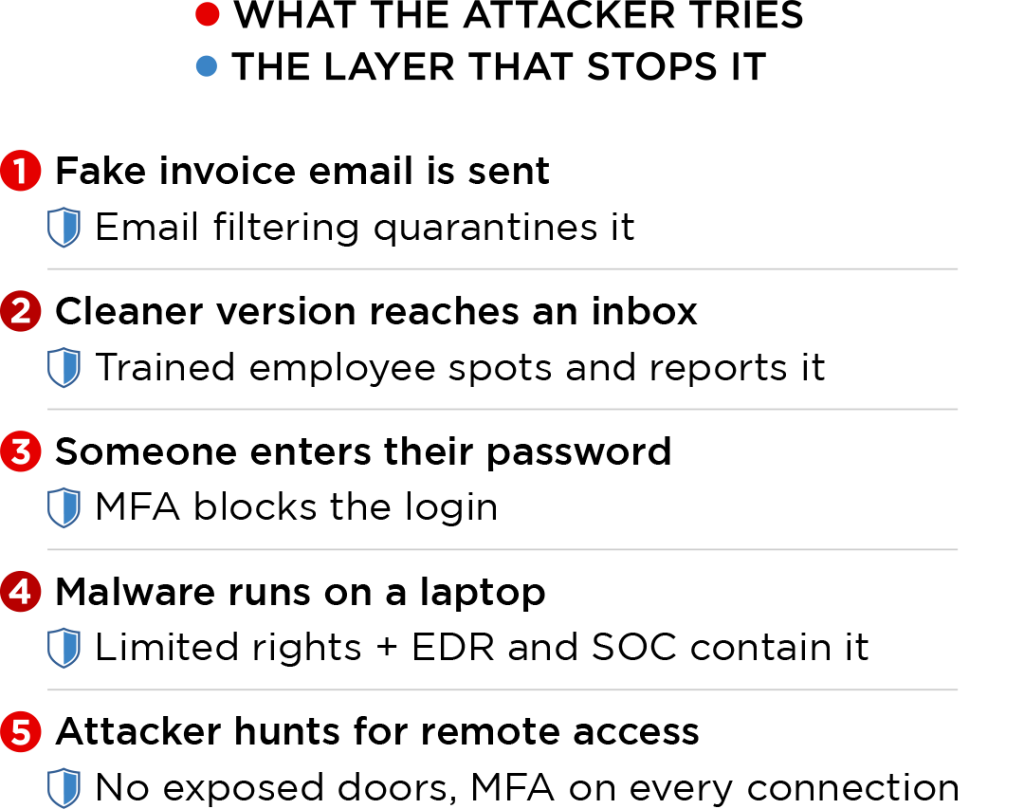
Step 1: The phishing email. The attacker sends a convincing fake invoice to the accounting department. Email protection flags the spoofed sender and the malicious link and quarantines the message. Most attacks end right here.
Step 2: A variation gets through. The attacker tries again with a cleaner message from a compromised vendor account. This one lands in an inbox. But the employee has seen similar examples in training, notices the vendor’s payment request doesn’t match how they usually work, and reports it instead of clicking.
Step 3: Someone clicks anyway. Suppose a different employee, in a hurry, clicks and enters their password on a fake login page. The attacker now has a valid password. But MFA blocks the login because the attacker doesn’t have the employee’s phone. And because the password manager means that password wasn’t reused anywhere else, nothing else is exposed.
Step 4: Malware reaches a computer. Suppose a malicious file does run on a laptop. Because the user works as a standard user, not an admin, the malware can’t disable security tools or install itself deeply. Managed EDR spots the suspicious behavior, isolates the laptop from the network, and alerts analysts in the 24/7 SOC, who investigate right away.
Step 5: The attacker looks for another way in. Frustrated, the attacker scans for remote access. There’s no exposed remote desktop, and every remote connection requires verified identity and MFA. The door is closed.
At every step, a different layer did the work. Without any one of them, the attacker would have gotten further. With all of them, the attack fails, and the business keeps running.
One attack, five chances to stop it
Each layer covered this month catches the attacker at a different step.

Why isn’t one strong security tool enough?
One tool isn’t enough because every tool has gaps, and attackers specifically design their methods to slip through the gaps of the most common protections. Layers make sure that the gap in one tool is covered by the strength of another.
It’s also why buying security products isn’t the same as being secure. Tools need to be configured correctly, monitored, updated, and supported by people who know how they fit together. A powerful tool that’s half set up, or that nobody watches, offers much less protection than it appears to.
Where does your business stand? A 12-question checklist
Use these questions to get a quick sense of your current protection. Every “no” or “I’m not sure” points to a gap worth addressing.
- Does all incoming email pass through a dedicated filter beyond the built-in spam protection?
- Is email impersonation of your leadership and vendors detected and flagged?
- Does your team get security training more than once a year?
- Do you run simulated phishing tests?
- Does your team use a business password manager?
- Is MFA turned on for email, banking, and every admin account?
- Is every computer and server protected by EDR, not just antivirus?
- Are security alerts reviewed by someone around the clock?
- Do everyday users work without admin rights?
- Are shared admin passwords secured and changed regularly?
- Is remote desktop blocked from direct internet access?
- Do you know every person and vendor who can connect to your systems remotely?
Security is a habit, not a one-month project
Cybersecurity Awareness Month is a great reminder, but attackers don’t take the other eleven months off. The businesses that stay safe treat security as an ongoing part of how they operate: reviewing access, training their team, keeping tools updated, and adjusting as threats change.
That doesn’t mean you need to become a security expert. It means having a partner who handles it with you.
Let’s look at your layers together
At Absolute, we do IT differently. We work as an extension of your team, building and supporting every one of these layers so you can focus on running your business. If the checklist above raised a few questions, we’d be glad to walk through it with you.
Call us at 903-807-0303 or reach out via our contact form.
Share this Post
What's New?
No Single Tool Keeps You Safe. Here’s How the Layers Work Together.

Remote Access Without Leaving the Door Open

Admin Accounts Are the Keys to the Kingdom. Who’s Holding Them?

Antivirus Isn’t Enough Anymore. Here’s What Comes Next.