Last week we talked about admin accounts and why limiting who holds those keys matters so much. This week, we’re looking at a closely related question: who can reach your systems from outside your building, and how?
Remote access is part of everyday business now. Employees work from home. Owners check reports from the road. Your IT provider supports servers remotely, and software vendors log in to maintain their applications. All of that is useful. But every one of those connections is also a potential way in, and attackers spend a lot of time looking for remote access that isn’t properly protected.
Why is remote access a common target for attackers?
Remote access is a common target because it’s designed to let people reach internal systems from the internet. If it’s poorly secured, an attacker who finds it, or who has a stolen password, can log in from anywhere and look just like a legitimate user.
Attackers constantly scan the internet for remote access services. When they find one, they try stolen or guessed passwords, look for unpatched software, or simply log in with credentials bought from a previous breach. A successful remote login can give them the same access as an employee sitting at a desk in your office.
Attacker use of remote management tools jumped 27% in a year
Legitimate remote tools showed up in 24% of incidents in 2025, while classic hacking tools fell out of favor.

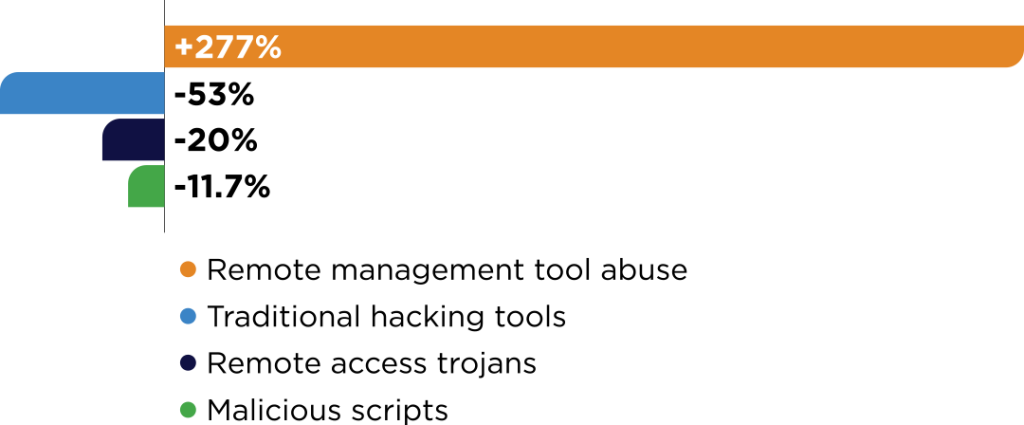
Year-over-year change in how often each tool type appeared in incidents, 2024 to 2025.
Huntress 2026 Cyber Threat Report · tool use in incidents, 2024 to 2025
These are the same kinds of tools IT teams use every day, which is exactly why attackers like them: the activity blends in. Controlling which remote tools can run in your environment matters as much as securing the ones you use. Source: Huntress 2026 Cyber Threat Report.
What remote access setups are most risky?
The riskiest setups are remote desktop exposed directly to the internet, VPN or remote accounts without multi-factor authentication, accounts belonging to former employees or vendors, and shared remote logins nobody monitors.
Here’s what we see most often when reviewing a new client’s environment:
- Open remote desktop (RDP). A computer or server reachable directly from the internet, often protected only by a password.
- No multi-factor authentication. A stolen password is all an attacker needs.
- Forgotten accounts. Former employees, past vendors, or test accounts that still work.
- Shared logins. One account used by several people or companies, so nobody knows who actually connected.
- Always-on vendor access. Third-party remote tools left installed and running long after the work was done.
- Outdated remote access software. Unpatched VPNs and remote tools with known vulnerabilities.
None of these are unusual. Most build up gradually over years as businesses grow, change vendors, and solve immediate problems quickly.
Is a VPN enough to secure remote access?
A VPN encrypts the connection, which is important, but on its own it often gives users broad access to the entire network rather than just what they need. If a VPN account is compromised, the attacker may be able to reach far more than that user ever should.
That’s the core weakness of the traditional “castle and moat” model. Once someone is across the moat, they’re inside the castle. Modern security thinking, often called zero trust, flips that around: nobody is trusted by default, and every request for access is verified and limited to what that person actually needs.
VPNs still have a place, especially when they’re patched, require MFA, and are tightly scoped. But for many remote access needs, there are better options.
What does secure remote access look like?
Secure remote access verifies who is connecting every time, gives each person access only to the specific systems they need, and keeps a record of each session. Access is granted on purpose, not left open by default.
There’s no one-size-fits-all remote access tool. We choose and set up the right solution for each client based on how their team works, who needs access, and what they need to reach. Every setup we build follows the same principles:
- Access to specific systems, not the whole network. A user or technician connects to the server or application they need, not everything behind the firewall.
- Identity verification with MFA. Every connection requires more than a password.
- No exposed remote desktop. Systems aren’t left reachable from the open internet.
- Approved, time-limited access. Elevated or sensitive access is granted for a task and removed when it’s done.
- Session records. You can see who connected, to what, and when.
The result is that the right people get in easily, and everyone else, including someone holding a stolen password, hits a wall.
How should a business handle vendor remote access?
Vendor access should be granted only when it’s needed, limited to the specific systems the vendor supports, protected with MFA, and logged. Vendors should never have permanent, unmonitored access to your network.
Third-party access deserves extra attention because you don’t control the vendor’s security. If one of your vendors is compromised, their access to your systems becomes the attacker’s access. A few practical rules:
- Give each vendor its own account. No shared logins.
- Limit access to what they support. A phone system vendor doesn’t need access to your file server.
- Turn access on when needed, off when done. No always-on remote tools.
- Require MFA. Even for trusted partners.
- Review vendor access regularly. Remove accounts for vendors you no longer use.
What should you check today?
If you’re not sure how secure your remote access is, these questions are a good starting point:
- Is any computer or server reachable by remote desktop directly from the internet?
- Does every remote access method require multi-factor authentication?
- Do any former employees or vendors still have working remote accounts?
- Do you know which outside companies can connect to your systems today?
- Could you tell who connected to a server last Tuesday, and what they did?
This Thursday, we’ll wrap up Cybersecurity Awareness Month by putting all of these layers together: email protection, training, passwords, endpoint protection, and access management, and how they cover for each other.
Let’s close the doors you don’t need open
At Absolute, we do IT differently. We help businesses give remote access to the people who need it without leaving doors open for anyone else. If you’re not sure who can reach your systems from outside your office, we’ll help you find out.
Call us at 903-807-0303 or reach out via our contact form.
Share this Post
What's New?
No Single Tool Keeps You Safe. Here’s How the Layers Work Together.
Remote Access Without Leaving the Door Open

Admin Accounts Are the Keys to the Kingdom. Who’s Holding Them?

Antivirus Isn’t Enough Anymore. Here’s What Comes Next.