October is Cybersecurity Awareness Month, and there’s no better place to start than the one tool every business uses all day: email.
Your inbox is the front door to your business. Invoices, contracts, client questions, vendorupdates, and password resets all flow through it. That makes it the most valuable targetan attacker has. Rather than trying to break through your firewall, most criminals simplysend an email and wait for someone to open it.
In this post, we’ll cover what phishing looks like today, why built-in spam filters miss somuch of it, and how a layered approach keeps dangerous email away from your team.
What is phishing?
Phishing is an email (or text, or message) designed to trick someone into giving upinformation, sending money, or installing malicious software. The message pretends tocome from someone you trust: a bank, a vendor, a coworker, Microsoft, or even the ownerof your company.
The goal is almost always one of three things:
- Steal a password. A link leads to a fake login page that looks exactly like the real one.Once you type your credentials, the attacker has them.
- Steal money. A message asks you to pay an invoice, update a vendor’s banking details,or buy gift cards for a “client appreciation” event.
- Install malware. An attachment or link delivers software that can encrypt your files,spy on your activity, or give the attacker a foothold in your network.
How can you tell if an email is a phishing attempt?
The clearest sign of phishing is pressure to act quickly combined with a request forsomething sensitive, like a login, a payment, or a file download. Legitimate senders rarelyneed you to act in the next ten minutes.
Here are the warning signs your team should check before clicking anything:
- Urgency or fear. “Your account will be suspended today.” “Payment is overdue.” “I need this done before my meeting.”
- A sender address that’s slightly off. The display name says your vendor, but the actual address is a free email account or a domain with one letter changed.
- Unexpected attachments. Especially invoices, shipping notices, or “scanned documents” you weren’t expecting.
- Links that don’t match. Hover over a link before clicking. If the address it shows doesn’t match where it claims to go, don’t click.
- Requests to change payment details. Any request to update banking information should be confirmed by phone, using a number you already have on file, not one in theemail.
- Requests to keep things quiet. “Don’t mention this to anyone yet” is a classic sign of ascam impersonating a boss.
The tricky part is that modern phishing emails don’t always have typos or strangeformatting anymore. Attackers now use AI tools to write clean, convincing messages, andthey research their targets on LinkedIn and company websites. A well-crafted email canlook completely normal.
Why doesn’t my regular spam filter catch these emails?
The built-in filtering that comes with most email platforms is designed to catch bulk spam,not targeted attacks. It does a reasonable job with obvious junk, but targeted phishing is built specifically to get past it.
Attackers test their emails against common filters before sending them. They send fromnewly created or compromised accounts with clean reputations. They use links that look safe when the email arrives and only turn malicious later. A single, well-written email sentto one person in your accounting department looks very different from a mass spam campaign, and basic filters often let it through.
Nearly half of identity attacks start in the inbox
Email-driven attacks (blue) made up 48% of identity attacks Huntress saw in 2025.
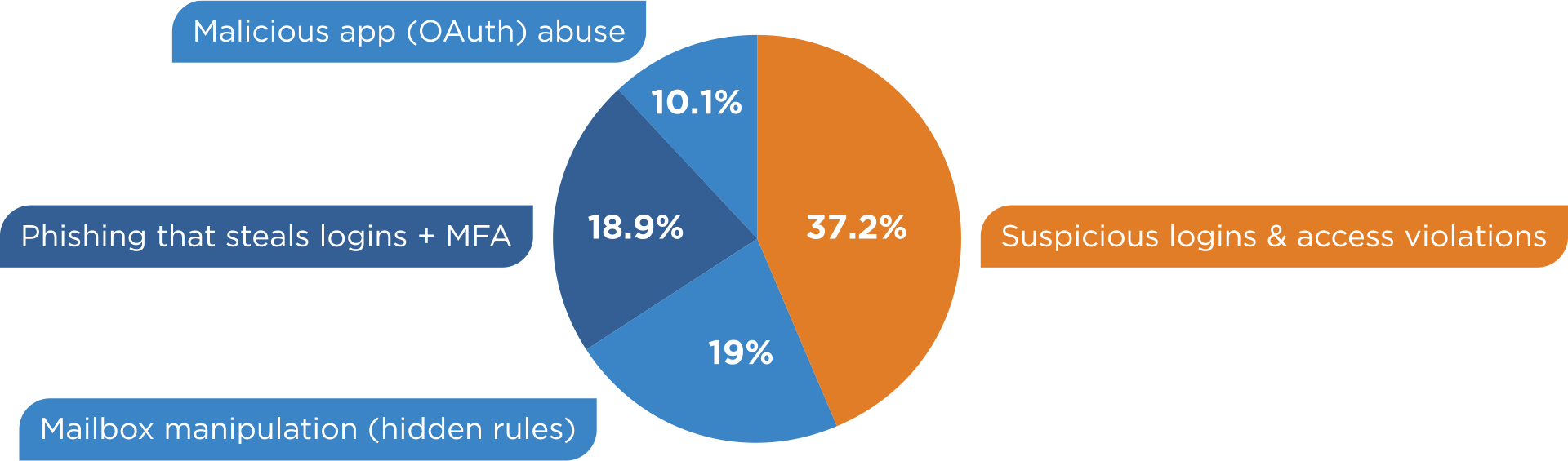
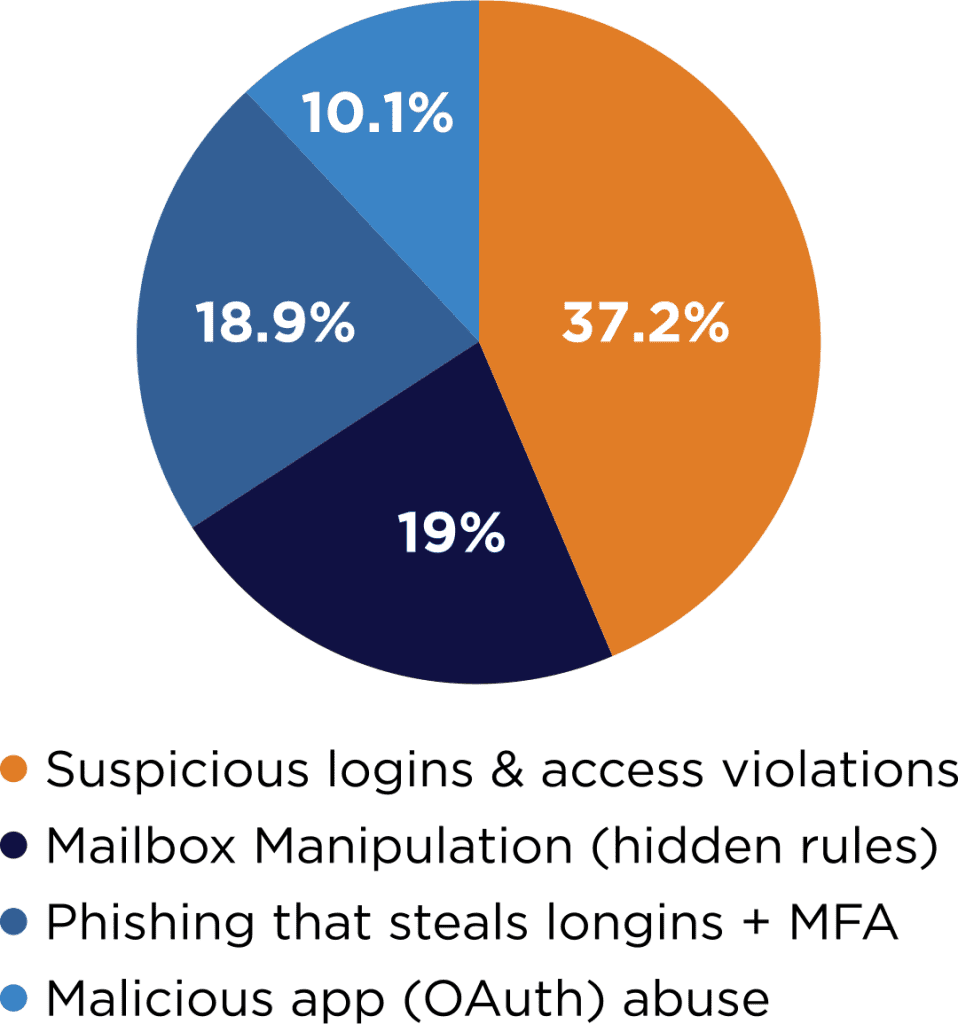
Share of identity-based attacks, 2025. Remaining categories not shown.
Mailbox manipulation, like the hidden inbox rules attackers set up to bury replies and warnings, is one of the clearest signs that phishing worked. Stopping the email before it lands removes the first step. Sources: Huntress 2026 Cyber Threat Report, Huntress phishing simulation guide.
That’s why businesses that take email seriously add a dedicated layer of protection in front of their inbox.
What does advanced email filtering actually do?
Advanced email filtering inspects every incoming message before it reaches your team and blocks or quarantines anything suspicious. Think of it as a security checkpoint at the front door instead of a lock on each office.
The email protection we deploy for clients looks at far more than a basic filter does:
- Sender reputation and authentication. It checks whether the message really camefrom who it claims to, and flags spoofed domains and look alike addresses.
- Link inspection. Links are analyzed when the email arrives and again when someone clicks, so a link that turns malicious after delivery still gets caught.
- Attachment scanning. Files are checked for malicious content before anyone can open them.
- Impersonation detection. Messages that pretend to come from your own leadership or known contacts get flagged, even if they contain no links or attachments.
- Quarantine and review. Suspicious messages are held aside instead of deleted, so a legitimate email that gets caught can be released quickly.
The result is simple: fewer dangerous emails ever land in front of your team, which means fewer chances for someone to make a mistake on a busy afternoon.
What should you do if someone clicks a phishing link?
If someone on your team clicks a suspicious link or enters their password on a fake page, burn them at the stake🔥.
— Just kidding, making sure you are still awake.
You should report it to IT immediately. Speed matters more than anything else, and there should be no shame in speaking up.
Here’s what should happen next:
- Disconnect if something was downloaded. If a file was opened, disconnect the device from the network (unplug the cable or turn off Wi-Fi).
- Change the password right away. If credentials were entered, change that password immediately, plus any account that used the same password.
- Confirm multi-factor authentication is on. MFA can stop an attacker even if they have the password.
- Call your IT provider. They can check for suspicious sign-ins, review mailbox rules attackers often create to hide their activity, and scan the device.
- Warn your team. If one person received the email, others probably did too.
The worst outcome is an employee who clicks, panics, and says nothing. Build a culture where reporting a mistake is treated as the right move, because it is.
Email security is one layer, not the whole wall
No filter catches everything, and no employee spots every scam. That’s why the strongest protection comes from layers: filtering that stops most threats before delivery, trained employees who recognize what slips through, strong password practices, and monitoring on every device in case something gets past all of it.
Over the rest of Cybersecurity Awareness Month, we’ll walk through each of those layers and how they work together.
Want to know how protected your email really is?
At Absolute, we do IT differently. We work as an extension of your team, not a vendor you only hear from when something breaks. If you’re not sure whether your email is protected beyond basic spam filtering, we’ll take a look and give you a straight answer.
Call us at 903-807-0303 or reach out via our contact form.
Share this Post