
Last week we talked about how most attacks start in the inbox, and how email filtering stops the majority of them before they arrive. But no filter is perfect. Eventually, a convincing email gets through, and a real person has to decide whether to click.
That moment is where security awareness training earns its keep.
Your firewall, antivirus, and email filter all follow rules. Attackers know those rules and work around them. People, on the other hand, can notice when something feels off: a strange tone in a message from a coworker, an invoice from a vendor you don’t use, a login prompt that shows up when it shouldn’t. Training sharpens that instinct and gives your team a clear plan for what to do next.
What is security awareness training?
Security awareness training teaches employees how to recognize and respond to cyber threats like phishing, social engineering, password attacks, and unsafe browsing. Good programs focus on practical, everyday decisions rather than technical theory.
The goal isn’t to turn your office manager into a security analyst. It’s to make sure everyone on your team can answer a few simple questions in the moment:
- Does this message make sense?
- Is someone pressuring me to act quickly?
- Should I verify this another way before I click, pay, or reply?
- Who do I tell if something seems wrong?
Why doesn’t once-a-year training work?
Annual training fails because people forget most of what they learn within weeks, and attacker tactics change far faster than once a year. A single long session also competes with real work, so employees click through it just to finish.
Think about any skill you’ve built. You didn’t learn to drive in one afternoon and then never touch a car for twelve months. Security habits work the same way. They come from repetition and real practice, not a single lecture.
There’s also a content problem. The phishing emails of a few years ago were often easy to spot, with awkward wording and obvious errors. Today, attackers use AI to write clean, personalized messages. Training built on old examples teaches people to look for the wrong things.
More than helf of malware loads relied on tricking a person
ClickFix lures drove 53% of the malware loader activity Huntress saw in 2025.
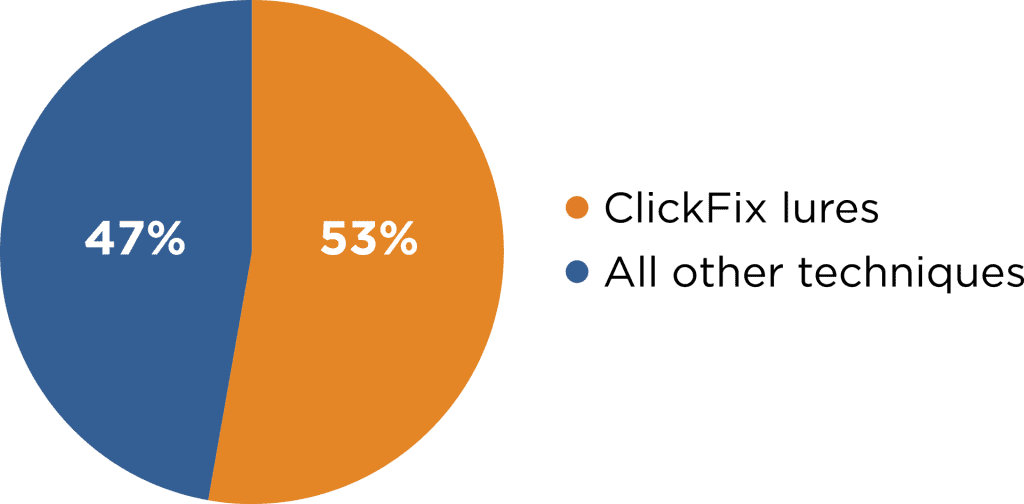
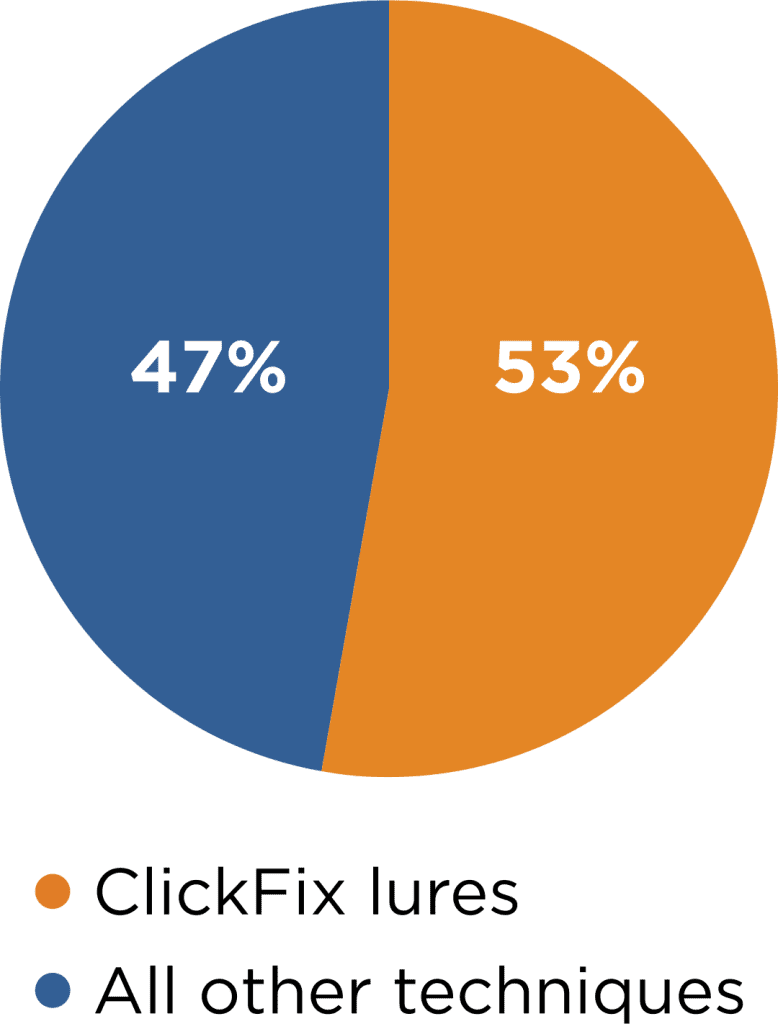
Fake CAPTCHA or error pop-ups that talk the user into running the attacker command.
Huntress 2026 Cyber Threat Report · malware loader activity, 2025
ClickFix attacks show a fake error or CAPTCHA and walk the user into running the attacker’s command themselves. No filter catches that moment; a trained eye does. Source: Huntress 2026 Cyber Threat Report.
What does effective security awareness training look like?
Effective training is short, frequent, and relevant to the threats your team actually sees. Instead of one long annual course, employees get brief lessons throughout the year, reinforced with realistic practice.
The training program we provide for clients is built around a few principles:
- Bite-sized lessons. Short episodes that take a few minutes, so they fit into a workday instead of interrupting it.
- Current threats. Content is updated as attacker tactics change, so your team learns to spot what’s actually landing in inboxes now.
- Engaging delivery. Story-driven lessons people actually pay attention to, rather than dry policy reading.
- Simulated phishing. Realistic practice emails that test whether lessons are turning into habits.
- Reporting and progress tracking. Visibility into who’s completed training and where your team needs more support.
What is a simulated phishing test?
A simulated phishing test is a safe, fake phishing email sent to your employees to see how they respond. Nobody’s data is at risk, and the results show where your team is strong and where more training would help.
If an employee clicks, they’re usually taken to a short explanation of what they missed and how to spot it next time. That turns a mistake into a learning moment at exactly the right time: right after it happened.
The point of simulations isn’t to catch people or embarrass anyone. It’s to practice in a safe setting so the real thing feels familiar. Over time, most organizations see click rates drop and reporting rates climb, which is exactly the trend you want.
How do you build a culture where employees report mistakes?
You build a reporting culture by treating every report as a win, including reports of mistakes. If people fear getting in trouble for clicking a link, they’ll stay quiet, and a quiet mistake is far more dangerous than a reported one.
A few practical steps help:
- Make reporting easy. One button, one email address, or one phone number. Nobody should have to wonder who to tell.
- Respond with thanks, not blame. “Thanks for flagging this” goes a long way, even when the email turns out to be harmless.
- Share examples. When a real phishing attempt gets reported, share it (with sensitive details removed) so everyone learns from it.
- Lead from the top. When owners and managers complete training and talk about it openly, everyone else takes it seriously.
The businesses that recover fastest from security incidents are almost always the ones where someone spoke up early.
Who in your business needs security training?
Everyone with a company email address or access to company systems needs security training, including owners and executives. Leadership is often targeted more heavily because attackers know they can approve payments and access sensitive information.
It’s also worth paying extra attention to roles that handle money or data: accounting, HR, office managers, and anyone who can change vendor payment details. These people receive the most targeted scams and benefit the most from regular practice.
Training works best alongside the right tools
Training doesn’t replace technical protection, and technical protection doesn’t replace training. They cover each other’s gaps. Filtering keeps most threats out of the inbox. Training helps people handle what gets through. Endpoint monitoring catches the rare case where something slips past both.
Later this month, we’ll cover passwords, endpoint protection, and access management, and how each one fits into a complete security picture.
Find out how your team would respond
At Absolute, we do IT differently. We help East Texas businesses build security habits that last, not just check a compliance box. If you’d like to know how your team would handle a realistic phishing attempt, we’d be glad to talk it through.
Call us at 903-807-0303 or reach out via our contact form.
Share this Post